Git Foundations #1 | Why Git? Version Control Explained for Beginners
Whether you’re a developer, tester, DevOps engineer, SRE, IT administrator, or simply someone who wants to keep track of documents, Git is one of the most valuable tools you can learn.
In this series, Git Foundations, I’ll explain Git from scratch in a simple, practical way. We’ll start with the fundamentals, build up step by step, and focus on understanding why Git works the way it does, not just memorizing commands.
But before we start writing Git commands or creating our first repository, I’d like us to answer a much more important question:
Why was Git created in the first place?
Once you understand the problem Git was designed to solve, learning Git itself becomes much easier.
So, let’s forget about Git for a moment and start from the beginning.
Before Git
Let’s say you’re working on a project.
You build the first version, then a few days later you add a new feature. After that, you fix a bug, make another improvement, and everything seems to be going well.
Then one day something breaks.
Naturally, the first question that comes to mind is:
How can I get back to the version that was working yesterday?
Years ago, developers didn’t have Git to answer that question. Instead, they usually created another copy of the project every time they made an important change.
After a while, the project folder started looking something like this:
project.zipproject_v2.zipproject_final.zipproject_FINAL.zipproject_FINAL_v2.zipproject_FINAL_FINAL.zipproject_USE_THIS.zip
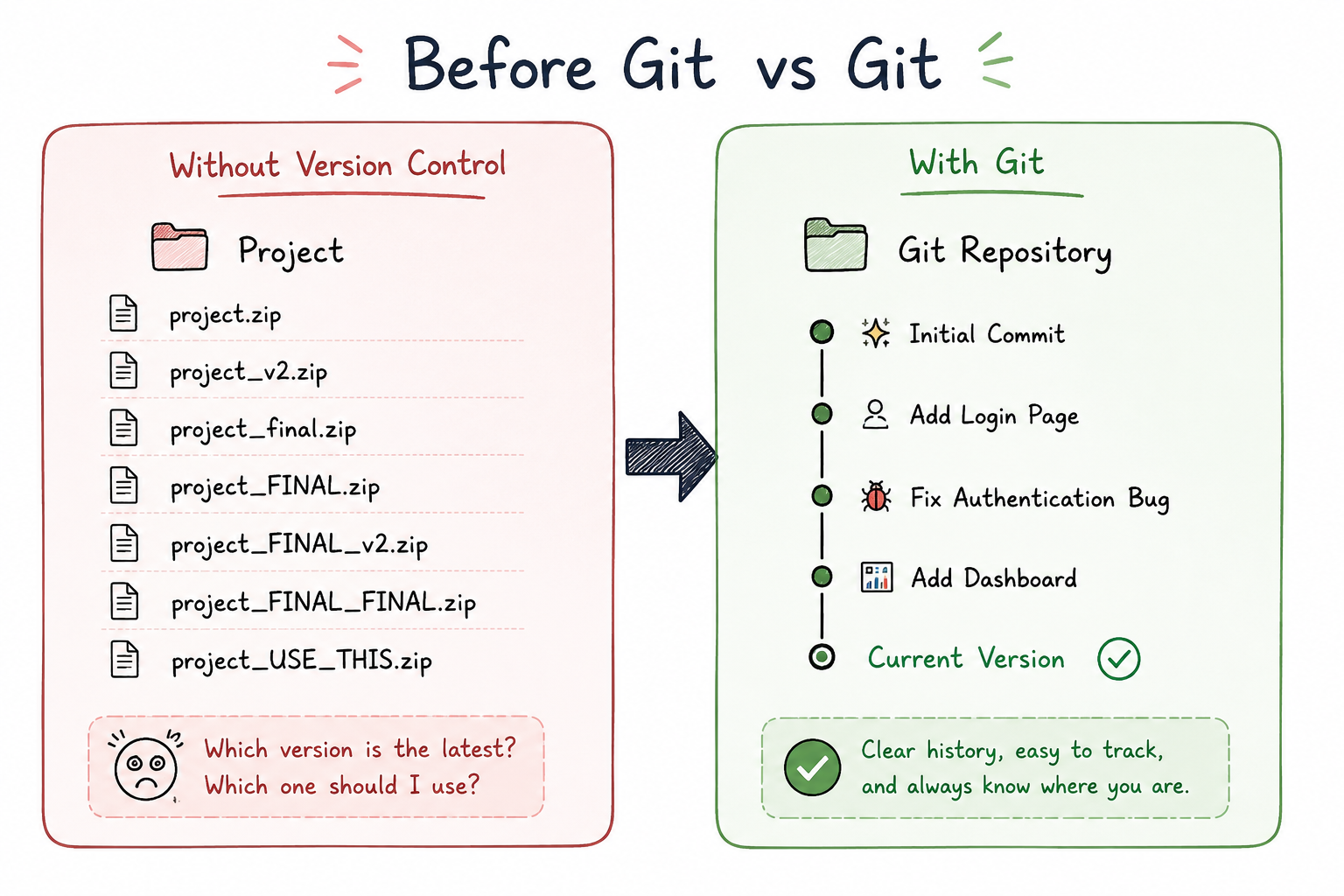
If you’ve ever named a file project_final_FINAL.zip, don’t worry—you weren’t the only one.
It looks funny now, but this was actually a common way of managing projects.
At first, it doesn’t seem like a problem. However, as the project grows, this approach quickly becomes difficult to manage.
For example, just by looking at those file names, can you tell which one contains the latest version of the project?
Probably not.
Now imagine you discover a bug and need to restore the version that was working yesterday. Which ZIP file should you choose?
Or imagine you’re no longer working alone. Two developers modify the same file, and both save their own copy. Without a proper version control system, one person’s changes can easily overwrite the other’s.
After a few weeks, another question usually appears:
Who made this change?
Or maybe:
Why was this line of code added?
Without any history, answering these questions becomes almost impossible.
And then there’s storage.
Nobody wants to lose their work, so everyone keeps creating more backup copies “just in case.” Over time, those backups continue to grow, and managing them becomes harder than managing the actual project.
Clearly, there had to be a better way.
Version Control
The challenges we just talked about weren’t unique to one developer or one company. As software projects became larger and more developers started working together, everyone faced the same problems.
That’s why version control systems were created.
I always like to think of version control as a time machine for your code.
Every meaningful change becomes part of your project’s history, giving you a timeline you can revisit whenever you need it.
Instead of creating dozens of copies of your project, a version control system records every meaningful change you make. Each change becomes part of your project’s history, allowing you to go back to any previous version whenever you need it.
If you introduce a bug, you can return to an earlier working version.
If you’re trying to understand when a change happened, you can check the project’s history.
If you want to know who made a particular change, that information is already recorded.
Instead of relying on folders full of ZIP files, you now have a complete history of your project that’s organized, searchable, and easy to understand.
Why Do We Need Version Control?
Once you start using version control, you realize that it solves much more than the problem of keeping multiple copies of your project.
Collaboration — Multiple developers can work on the same project without overwriting each other’s changes.
Versioning & History — Keep a complete record of every change: who made it, when, and why.
Traceability — Every change is linked to its author, making it easy to understand how and why the project evolved.
Revert to Any Version — Made a mistake? Roll back to any previous working state of your project instantly.
Finally, version control gives you confidence. If something goes wrong, you can always go back to a previous version instead of hoping one of those old ZIP files still exists.
The Evolution of Version Control
Version control didn’t start with Git.
Git is simply the latest step in a long evolution of version control systems. Before Git, developers had already tried different approaches to solve the same problem. Each generation improved on the previous one, but each also had its own limitations.
Let’s take a quick look at how version control evolved over the years.
Local Version Control Systems
The earliest version control systems worked only on your local machine.
They kept track of changes to your files, allowing you to restore previous versions whenever you needed to. This was a huge improvement over manually creating ZIP files because you finally had some form of history.
However, everything lived on a single machine. If that machine failed, you lost that history. And since there was no shared repository, collaboration wasn’t really possible.
One of the most well-known tools from this generation was RCS (Revision Control System).
Centralized Version Control Systems
As software teams became larger, developers needed a better way to collaborate.
Instead of everyone managing their own history, a single central server stored the project’s history, and every developer connected to that server to download changes and upload new ones.
This solved many collaboration problems and became the standard approach for years. Systems like SVN (Subversion) and TFVC (Team Foundation Version Control) are good examples of centralized version control systems.
Although this was a big step forward, it introduced a new challenge.
Since the server contained the only complete history of the project, it became a single point of failure. If the server was unavailable, developers couldn’t synchronize their work, and in many cases they couldn’t continue working normally.
Centralized systems solved many collaboration problems, but they also introduced new ones. Those limitations eventually led to the next evolution of version control systems, and that’s where Git comes in.
Distributed Version Control Systems
Instead of keeping the complete history on one central server, every developer has a full copy of the repository on their own machine.
In other words, every developer has their own complete copy of the repository—not just the latest version of the files, but the entire history of the project.
This design has several advantages.
You can continue working even without an internet connection because almost every Git operation happens locally.
You also have much better protection against data loss. Since every developer has a complete copy of the repository, there isn’t a single machine that all work depends on.
The server is still useful for sharing changes between team members, but it is no longer the only place where the project’s history exists.
The following diagram summarizes how version control systems evolved over time.
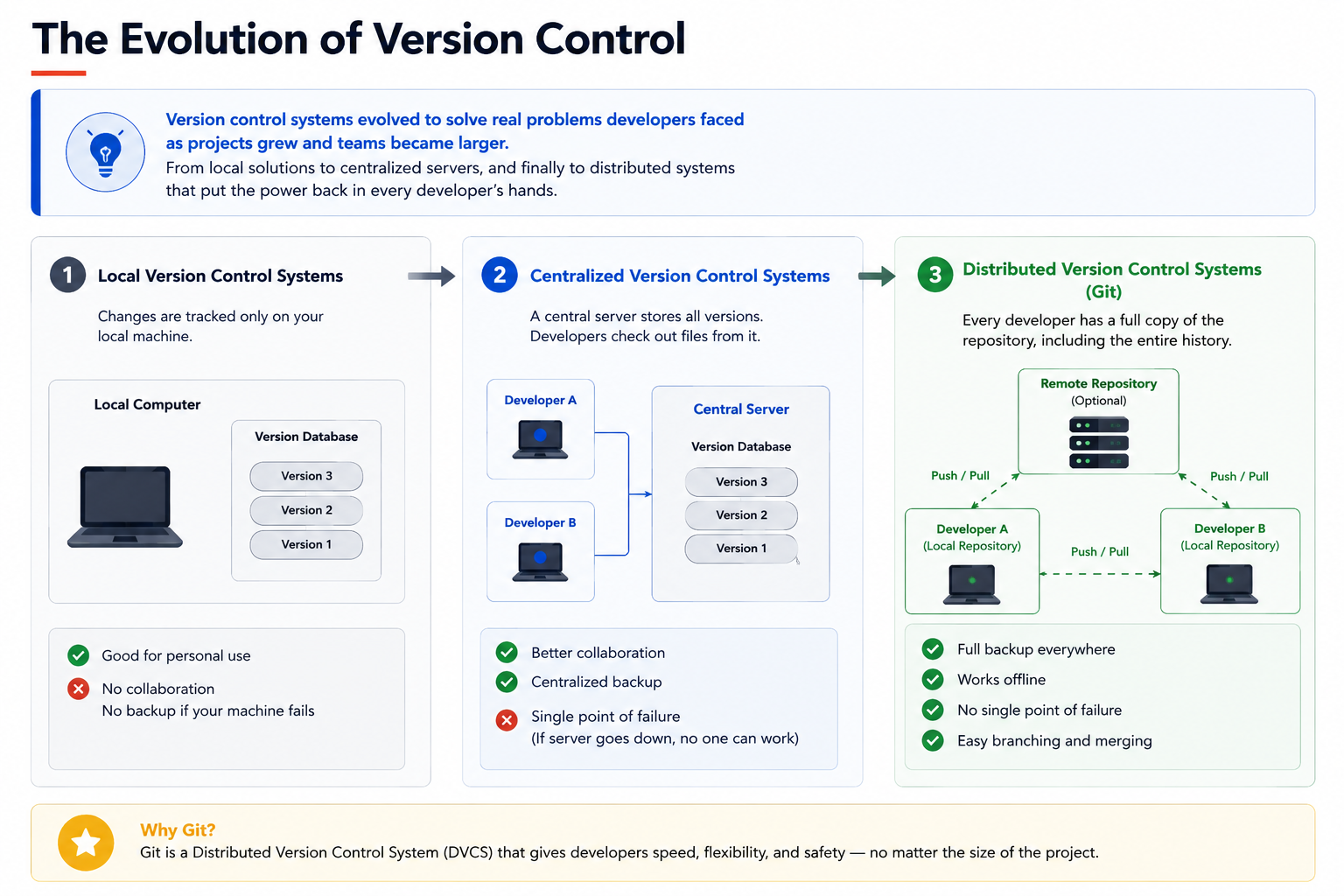
Notice how each generation addressed a limitation of the one before it. Git didn’t replace the idea of version control it built on decades of evolution to make collaboration faster, safer, and more flexible.
The difference between centralized and distributed version control becomes much easier to see when you compare them side by side.
| Centralized Version Control | Distributed Version Control (Git) |
|---|---|
| One complete copy of the repository | Every developer has a complete copy |
| Most operations require the server | Most operations work locally |
| Server failure affects everyone | Developers can continue working offline |
| Single point of failure | Multiple complete copies of the repository |
So, Why Was Git Created?
Now that we understand how version control evolved, another question naturally comes up.
If version control systems already existed, why did someone create Git?
The answer takes us back to 2005.
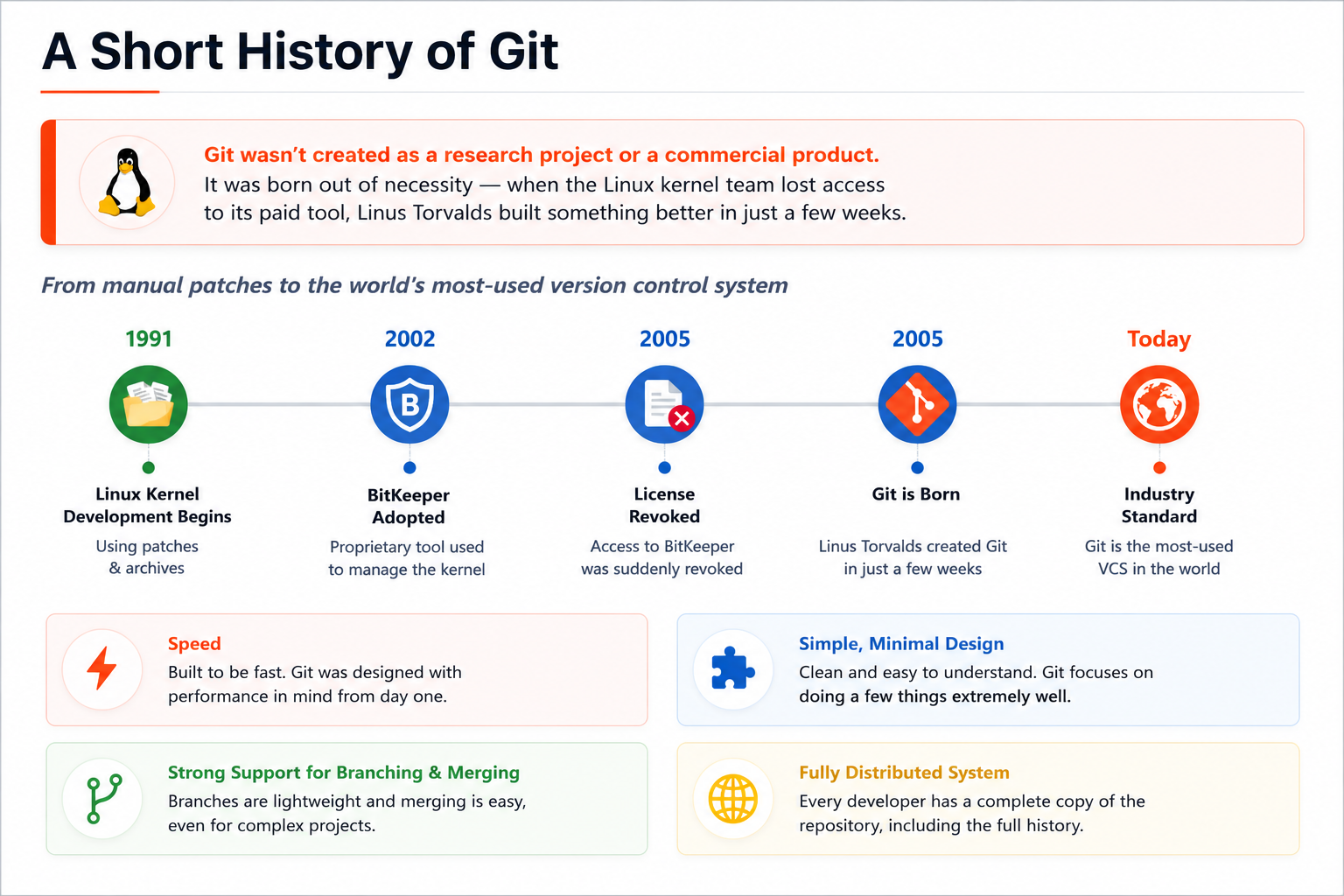
At that time, the Linux kernel was being developed using a proprietary version control system called BitKeeper.
When the Linux team lost access to BitKeeper, they suddenly needed another solution. Unfortunately, none of the available tools met their requirements.
So instead of choosing an existing tool, Linus Torvalds, the creator of Linux, decided to build a new one.
Git wasn’t created as a research project or a commercial product. It was built to solve a real problem, and from day one it had a few clear design goals:
- It had to be fast.
- It had to support large projects.
- It had to make branching and merging easy.
- It had to be distributed from the beginning.
Only a few weeks later, Git was born.
Today, Git has become the most widely used version control system in the software industry.
Key Takeaways
Let’s quickly recap what we’ve learned.
- Git wasn’t created just because developers wanted a new tool. It was created to solve real problems that teams were facing every day.
- Manually creating copies of a project doesn’t scale. As projects grow, it becomes difficult to know which version is the latest, recover from mistakes, or collaborate with other developers.
- Version control systems solve these problems by keeping a complete history of your project and every meaningful change made to it.
- Git is a distributed version control system, which means every developer has a complete copy of the repository and its history.
- Once you understand why Git exists, learning Git commands becomes much more intuitive.
What’s Next?
Now that we understand why Git exists and the problem it solves, it’s time to start using it.
In the next post, we’ll install Git, configure it for the first time, create our first repository, and make our very first commit.
See you in the next post!